


JusTalk Kids - Safe Messenger
4.75.78K Reviews
App Specs
- Version
- 2.14.4
- Updated On
- License
- Free
- Downloads
- 5,000,000+
- Developer
- JusTalk
- Categories
- Communication
- Platform
- Android, iOS
Screenshots
 Analysis by AppCompare
I see JusTalk Kids - Safe Messenger as a child-focused way to keep family conversations and calls in one place, rather than handing a younger child a general-purpose social app. That distinction is useful, but it is not a substitute for a parent’s judgement: the app works best when an adult helps set up the child’s contacts and agrees on how it will be used. I’d consider it for staying in touch with relatives or a small circle of friends, not as a reason to give a child unrestricted online access.
A messenger built around family contact
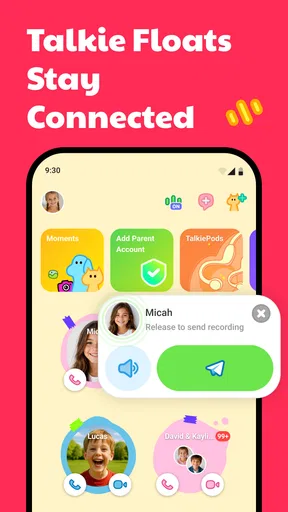
JusTalk is the developer behind this free communication app, which brings messaging, voice and video calls, group chat, and shared activities together. The central appeal is convenience: a child can reach approved people without needing to move between a family chat app, a video-calling tool, and a separate place to play together. For a parent, that can make it easier to establish a simple routine around who the child talks to and when.
The app has a 4.6 average from around 57,000 ratings, and it has been installed over five million times. Those figures suggest that many families have tried it, but I wouldn’t treat popularity as proof that it suits every household. The more relevant question is whether your child has people they can safely contact through it and whether you want a dedicated kids’ messenger instead of a general messaging service.
It is free to download, rated for Everyone, and the current version is 2.12.1. It supports Android 6.0 and newer, while in-app purchases range from $0.99 to $79.99 per item. I’d check the purchase settings on the device before letting a child explore independently; “free” does not mean every optional item is free. The app was released on June 15, 2018, so it is an established product rather than a brand-new experiment, though that alone doesn’t tell you how well it fits your family’s needs today.
Where calls and group chats fit into daily life
A practical use is a child calling a grandparent after school without borrowing an adult’s phone or being added to a large general family account. Group chat can also help a few relatives coordinate a birthday greeting or keep a small family conversation going. I find this more compelling than the novelty of stickers: the real value is giving children a familiar way to stay connected while adults keep the contact circle deliberate.
Voice and video calls are useful when typing is still awkward or when a quick conversation is easier than a string of messages. The together-party activities add another option for relatives who live far apart: instead of a call that depends on everyone having something to say, they can share a light activity. That can make a short check-in feel more natural, especially with younger children who may lose interest in a plain video call.
There is a trade-off, though. A child who only needs to call parents may not need a full messenger, and an adult’s existing family chat may already be enough for supervised contact. Conversely, if the people your child needs to reach are not willing or able to use another app, a dedicated kids’ service creates friction rather than solving it. Before setting it up, I’d ask the grandparents or other regular contacts whether they will actually use it.
Worth Reading Before You Choose

EA SPORTS FC Mobile 26 Is a Bigger Football Game, but It Takes Time

Flipboard Shows What News Apps Must Do Beyond the Feed

Switching to Android Auto Means Rethinking Your Driving Routine

Google Calendar Makes a Crowded Week Easier to Manage

Ludo King Makes the Most of the Minutes Between Plans

Baby Panda World Brings Quick Play to Modern Phones, but Its Game Library Feels Busy
What I would check before handing over the device
The name and child-oriented design can make the app sound like a complete safety solution, but I would still treat setup as a shared task. Sit with your child while creating the account, explain who belongs in the contact list, and agree on what to do if an unfamiliar person appears or a conversation feels uncomfortable. That conversation matters even when an app is designed for children; no interface can replace a child knowing they can come to you.
I would also look at the purchase controls before a child uses the app alone. Optional purchases can be easy to overlook when the main download costs nothing, so a parent should know how the device handles buying and whether approval is needed. This is a small setup step that can prevent an awkward surprise later, without assuming that a child will deliberately make a purchase.
Another useful habit is to decide when calls and messages are welcome. A child may interpret an always-available chat as an invitation to reply immediately, while a parent may want device-free time during meals or bedtime. Agreeing on simple boundaries at the start makes the app easier to live with and helps keep communication from becoming another source of family negotiation.
Ever been worried about your child's online safety while they chat with friends? Well, worry no more! I recently had the opportunity to dive into JusTalk Kids - Safe Messenger, and let me tell you, it’s an app that’s got parents talking (pun intended!). This app promises a safe and fun environment for kids to connect, and I was curious to see if it lives up to the hype.
What is JusTalk Kids?
So, what exactly is JusTalk Kids? It's a messaging app designed specifically for children. The app is a part of the JusTalk family, which is known for its secure messaging services. But this one is crafted with kids in mind, ensuring a safe space for them to chat, video call, and share fun moments without the risks associated with traditional social media platforms.
Setting Up is a Breeze
Getting started with JusTalk Kids is as easy as pie. The installation was quick on both my Android and iOS devices. Once downloaded, the app requires a parent or guardian to set up a main account. From there, you can create a profile for your child, complete with their own unique JusTalk ID.
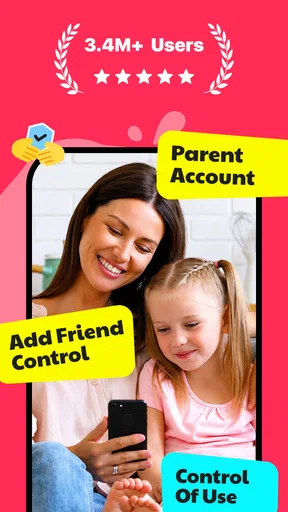
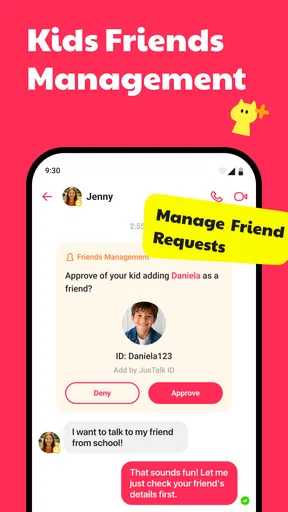
One feature I found particularly reassuring was the ability for parents to control and monitor their child’s contact list. You can add family members and trusted friends, ensuring that your kiddo only interacts with people you approve of. It's like a virtual playdate with added safety measures!
Features Your Kids Will Love
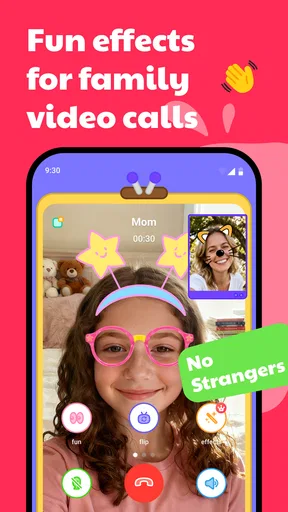
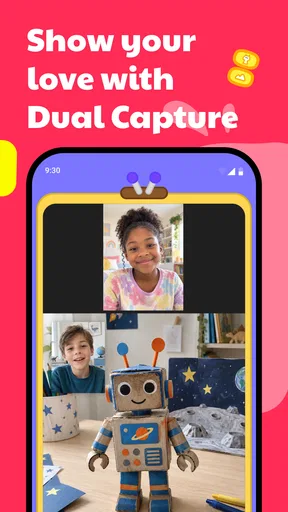
Now, let’s talk about what makes this app super engaging for kids. JusTalk Kids offers a range of features that are both fun and educational. First off, the app supports high-quality video calling. I tried it out, and the video clarity is impressive! No glitchy, pixelated screens here. Your child can enjoy clear conversations with their friends, making them feel like they’re right there in the room.
But the fun doesn’t stop there. The app also offers a variety of doodling tools and stickers. Kids can draw on the screen during calls, add funny stickers, and even send creative video messages. It’s like giving them a digital canvas to express themselves while chatting. How cool is that?
Security First, Always
Of course, while fun is important, security is crucial. JusTalk Kids doesn’t disappoint in this area. The app boasts end-to-end encryption, ensuring that all messages and calls are private and secure. Plus, the app doesn’t collect any personal data from kids, which is a huge relief for privacy-conscious parents.
There’s also a feature that prevents strangers from contacting your child, and rest assured, there are no in-app purchases or ads that could distract or lure your child into unwanted areas. The developers have really thought this through, keeping the app child-friendly and parent-approved.
Ease of Use
As a parent, you’ll appreciate how user-friendly JusTalk Kids is. Navigating the app is straightforward, with a clean, intuitive interface that even the youngest users can understand. The colorful design makes it inviting, and the simple layout means your child won’t need much help getting around.
I also loved the fact that the app sends regular updates and notifications to parents about their child's activity. It’s like having a window into their digital world without being intrusive.
How it compares with familiar options
Compared with a standard messaging app, the clearest difference is the child-first framing and the emphasis on parent-managed contacts. A regular messenger may be more convenient if the whole family already uses it, and it may avoid asking relatives to install something new. JusTalk Kids makes more sense when you want a separate space for a child’s conversations and are prepared to help manage the setup.
It also sits somewhere between a basic calling tool and a broader social platform. If the need is simply an occasional voice call to a parent, a basic phone call may be simpler. If the goal is a child-friendly way to combine calls, chats, group conversations, and shared activities, this app has a more focused role. I would not choose it just because it has more modes; I’d choose it when those modes support real relationships the child already has.
One practical tip is to keep the first contact list intentionally small. Starting with a parent and a couple of trusted relatives makes it easier for a child to understand who the app is for. You can widen that circle later if there is a clear reason, rather than treating every new social connection as an automatic reason to add another contact.
Another trade-off is that a dedicated child account can create a second communication routine for adults. Relatives may need reminders to check the app, and children may need help learning which conversations belong there. If the family is already spread across several messaging services, adding one more can make coordination harder. I’d make sure the people who matter most are willing to participate before relying on it for time-sensitive plans.
When I would recommend it—and when I wouldn’t
I’d recommend considering it for families who want a child to have a direct way to call and message a known group, especially when relatives live apart or the child is beginning to communicate more independently. It can also suit a household that wants group conversation and shared activities without putting a young user straight into a general social network. The key is that an adult remains involved in setting expectations and maintaining the contact circle.
I’d skip it if your child does not need their own messaging space, if their trusted contacts will not use it, or if your family prefers to keep communication on one established service. I’d also be cautious about presenting any child-oriented messenger as “safe” without context. A child still benefits from check-ins and clear rules, and parents should decide what level of independence is appropriate for that particular child.
For a realistic routine, imagine a child arriving home and wanting to tell a grandparent about a school project. They can start a call rather than waiting for an adult to pass over a phone, and the relative can respond directly. If the child is not ready to manage calls alone, a parent can help at first, then step back gradually. That gradual handoff is, to me, a more useful measure of success than simply installing the app.
Wrapping Up My Thoughts
All in all, JusTalk Kids is a fantastic choice for parents looking to provide a safe, fun, and engaging communication platform for their children. It ticks all the boxes in terms of safety, user-friendliness, and entertainment. The peace of mind it offers is truly invaluable. If you’re on the hunt for a secure messenger app for your kids, JusTalk Kids is definitely worth considering.
So, why not give it a whirl? With just a few taps, you can download it directly from the App Store or Google Play. Trust me, both you and your kids will be glad you did!
My recommendation is more specific than “every family should try it”: I’d start with a child who has a few trusted people to contact and a parent ready to guide the first conversations. The combination of calls, chat, group communication, and shared activities gives those relationships several ways to stay in touch, but the app only earns its place if the family actually uses it. If a simpler call or your existing family messenger already does the job, there is no need to add another account just for the sake of having a child-focused app.
Before making it part of your routine, I’d check the purchase settings, help your child understand their contact circle, and agree on when messages should be answered. Those small decisions address the main practical friction points: optional spending, a new service for relatives to remember, and the expectation that a child must always be available. Used with those boundaries, JusTalk Kids can be a thoughtful bridge toward more independent communication; without them, its child-friendly presentation may invite more confidence than the family’s habits support.
Pros
- Kid-friendly interface
- easy to navigate.
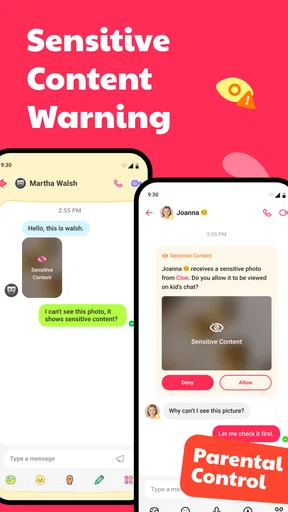
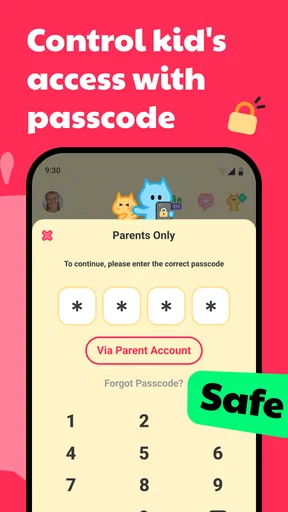
- Parental controls enhance safety.
- Fun stickers and doodles for kids.
- No ads
- ensuring distraction-free use.
- Supports video calls with family.
Cons
- Limited to contacts approved by parents.
- Some features require in-app purchases.
- Not available on all devices.
- May require strong internet for video calls.
- Limited customization options.
FAQs for JusTalk Kids - Safe Messenger
Is JusTalk Kids safe for my child to use?
Yes, JusTalk Kids is designed with safety as a top priority. The app does not require phone numbers to connect users, and all messages are encrypted to ensure privacy. Parents have full control over the contact list, ensuring that children can only communicate with approved contacts.
What age group is JusTalk Kids suitable for?
JusTalk Kids is specifically designed for children aged 6 to 12 years. The app offers a user-friendly interface with fun features tailored for young users, ensuring they can communicate safely and enjoyably under parental supervision.
Does JusTalk Kids allow in-app purchases?
JusTalk Kids does not include in-app purchases, making it a cost-effective option for parents. The app offers a range of fun features such as doodling, stickers, and games, all accessible without additional costs, ensuring a safe environment free from unexpected expenses.
Can JusTalk Kids be used without internet access?
JusTalk Kids requires an internet connection to function, as it is primarily a messaging and video calling app. Without access to Wi-Fi or mobile data, the app will not be able to send or receive messages or make video calls.
How can I manage my child’s contacts on JusTalk Kids?
Parents can manage their child's contacts directly through the app. JusTalk Kids allows parents to approve or deny contact requests, ensuring that children can only communicate with pre-approved friends and family members, thus maintaining a secure environment.


